
Not every user within GraydonCreditsafe can manage other users. What you can view and edit depends on your role.
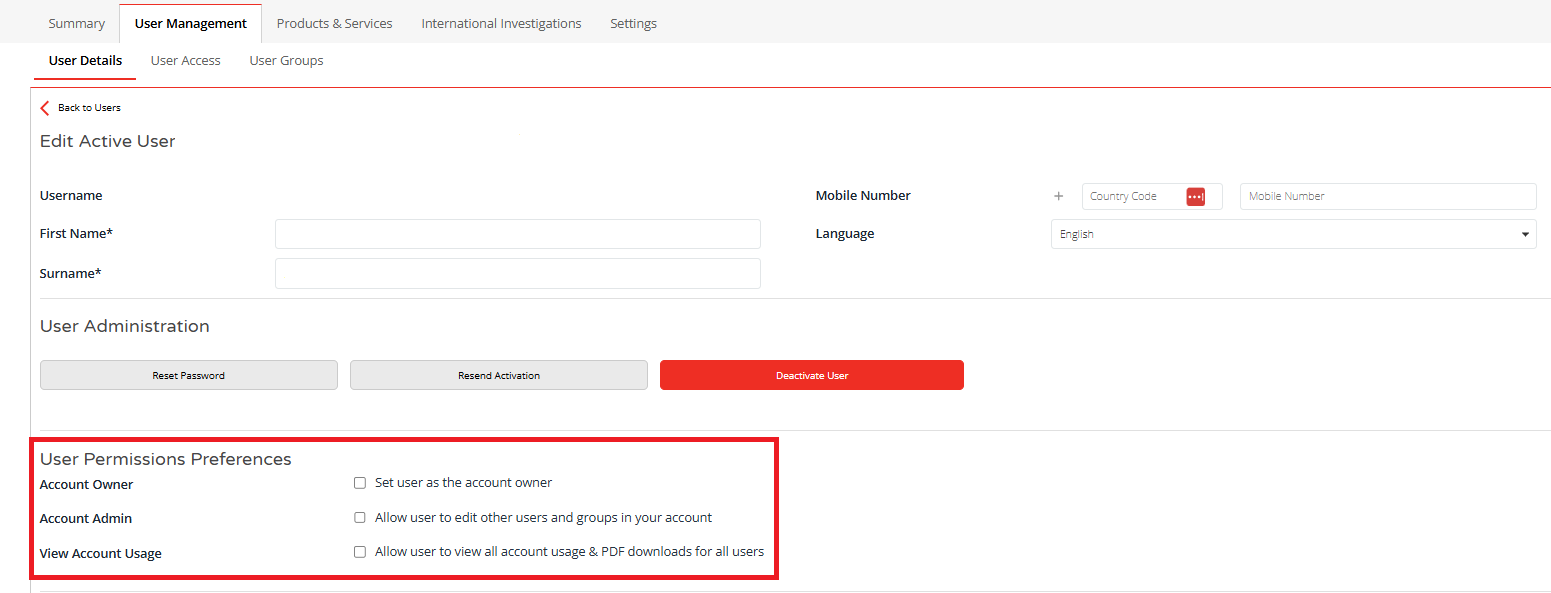
| Account Owner | Account Admin | View account usage | |
| Can edit users and groups | ✅ | ✅ | ❌ |
| Is considered the Account Owner | ✅ | ❌ | ❌ |
| Can view usage statistics | ✅ | ✅ | ✅ |
Who has access to User Management?
User Management is available to:
- the Account Owner
- Account Admins
Standard users do not have access to User Management and cannot add, edit, deactivate or delete users.
What is an Account Owner?
The Account Owner is the user with the most senior administrative role for your organisation’s account. The Account Owner can use User Management to manage users and their access.
The Account Owner:
- Has full rights to manage users and groups within your GraydonCreditsafe account.
- Is considered the owner of the account.
- Can view other users’ usage within the account via the Usage Statistics.
- Please note: There can only be one Account Owner per account.
What is an Account Admin?
An Account Admin also has access to User Management and can manage users within your organisation. This allows management responsibilities to be shared amongst several people within your organisation, meaning that not every change has to be carried out by a single person.
The Account Admin:
- Has full rights to manage users and groups, but is not considered the account owner.
- Can also view other users’ activity within the account via the Usage Statistics.
What is a standard user?
A standard user can use the GraydonCreditsafe products and features to which they have been granted access. However, a standard user cannot manage other users and therefore does not have access to User Management.
In the user preferences, you can choose:
- View account usage: can view the usage of other users within the account via the Usage Statistics.
- No rights granted: cannot view other users’ data or manage configuration settings.
Which users are visible in User Management?
In User Management, you can view and manage the users who have access to the GraydonCreditsafe web application. Does your organisation also use our services via the Connect API? Users who work exclusively via the Connect API are not displayed in User Management and cannot be managed here.
Does your organisation use both the web application and the Connect API? If so, please bear in mind that User Management does not provide a complete overview of all users of our services.
Do you want to determine which products a user has access to?
Do you want to adjust a user’s access to specific products? You can manage this via Product Groups. With Product Groups, you determine which products are available to which users.
You can find more information on setting this up and managing it in How do I grant users access to specific products?
Why can’t I see User Management?
Can’t see User Management? First, check whether you are an Account Owner or an Account Admin. Are you a standard user and do you need to change something about your account or access? If so, please contact the Account Owner or an Account Admin within your organisation.
Does your organisation not yet have User Management?
In that case, even the Account Owner and Account Admins will not yet be able to manage users themselves via User Management. Please contact support via support@graydoncreditsafe.be if you wish to:
- add a new user
- change a user’s details or permissions
- deactivate or delete a user
If you would like to make User Management available to your organisation so that the Account Owner and Account Admins can carry out these tasks themselves, please contact your Account Manager.